
AmCoder Learning to code is rarely difficult because there are not enough tutorials. The real problem is usually the opposite: there are too many.
A beginner can open YouTube and find tutorials for Python, JavaScript, React, SQL, data structures, artificial intelligence, Git, Docker, system design, and dozens of other subjects. The difficult part is deciding what to learn first and, more importantly, understanding how all those subjects connect.
That is the problem AmCoder is trying to address.
AmCoder is a software-engineering learning platform available at AmCoder.in. Rather than presenting programming as a collection of unrelated courses, its published learning path moves from computer-science fundamentals to problem solving, databases, APIs, application development, system design, and the tools developers use when working with other people.
That approach makes AmCoder interesting for students who feel they are constantly learning new programming topics but still do not understand how professional software is actually put together.
What Is AmCoder?
AmCoder is an educational platform focused on helping learners build a broader understanding of software engineering.
Its website describes the platform as a structured journey rather than a quick crash course. The roadmap begins with computer-science foundations and gradually moves toward algorithms, data structures, databases, backend development, frontend development, system design, and engineering collaboration tools.
That distinction matters.
For example, a beginner may learn how to write a JavaScript function in one afternoon. But knowing JavaScript syntax does not automatically explain:
- How a browser communicates with a server
- Where application data is stored
- How an API works
- Why databases use tables and relationships
- What happens when thousands of users access an application
- How developers collaborate using Git
- Why a particular system needs caching or a load balancer
AmCoder’s published curriculum attempts to connect these pieces instead of treating each one as a separate subject.
Why a Structured Learning Path Can Be Useful
One of the biggest mistakes beginners make is jumping between technologies.
A common pattern looks something like this:
HTML → Python → React → AI → Java → Docker → cybersecurity → back to JavaScript
After several months, the learner may know a little about many technologies but still struggle to build a complete application.
A structured roadmap can reduce that problem.
AmCoder divides its learning journey into several broad areas: Foundation, Thinking, Engineering Core, Building, Design, and Engineer’s Toolkit.
The sequence is useful because later subjects depend on earlier ones.
Consider a simple online shopping application.
A beginner might see the project as a React website. An engineer needs to think about much more:
- The browser displays the interface.
- JavaScript manages interactions.
- The frontend sends requests to backend services.
- APIs process those requests.
- A database stores products and customer information.
- The backend applies business rules.
- Authentication controls access.
- Caching may improve performance.
- Git tracks changes made by developers.
- Deployment makes the application available to users.
Once you understand those relationships, individual technologies become easier to place in context.
That is one of the more useful ideas behind AmCoder’s roadmap.
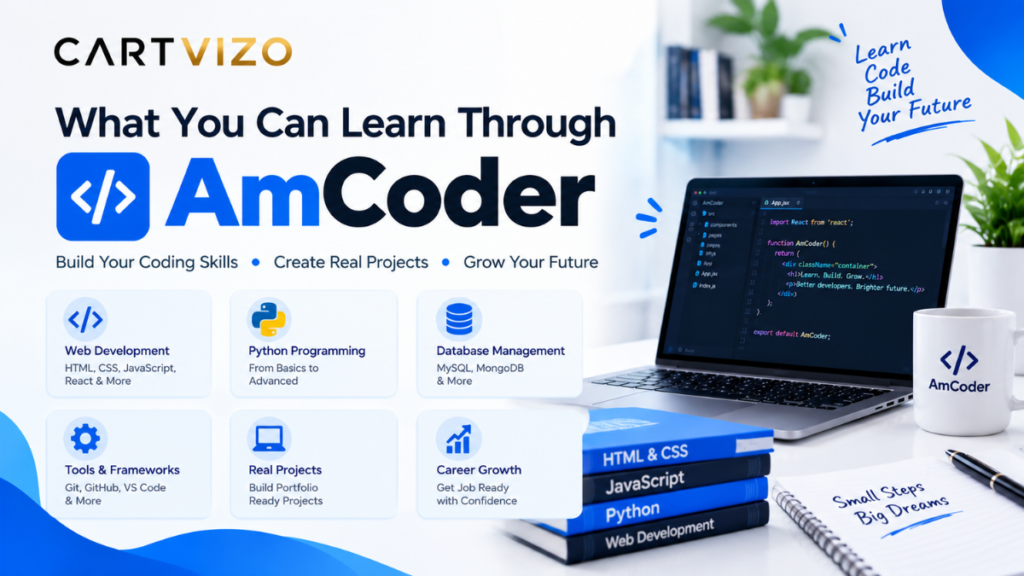
What You Can Learn Through AmCoder
1. Computer Science Foundations
AmCoder starts before the usual programming tutorial.
Its foundation section covers ideas such as how computation works, the relationship between hardware and software, operating systems, UNIX, memory, processes, and computer instructions.
For a complete beginner, this can answer questions that are often ignored in programming courses.
For example, when you run a program, where does it actually run?
What happens to the program in memory?
What is a process?
Why does an operating system exist?
You do not necessarily need to become an operating-system developer to benefit from these concepts. They give you a better mental model of what your code is actually doing.
2. Algorithms and Data Structures
The next major area is problem solving.
AmCoder presents data structures as practical tools rather than simply a list of topics to memorize. Its roadmap includes arrays, stacks, queues, trees, graphs, algorithms, and time and space considerations.
This is particularly useful when preparing for technical interviews.
Suppose you need to search through thousands of records.
A beginner might immediately start writing loops. Someone with a stronger understanding of algorithms first asks:
What operation do I need to perform, and which data structure is appropriate for it?
That change in thinking is more valuable than memorizing dozens of interview solutions.
3. Databases and Backend Fundamentals
The Engineering Core section moves into topics that are closer to everyday application development.
AmCoder’s published curriculum includes memory versus disk, relational databases, schemas, SQL, APIs, backend fundamentals, server thinking, and system failures.
These are skills you will encounter in real projects.
Imagine building a small appointment-booking application.
You might need tables for:
- Users
- Doctors
- Appointments
- Available time slots
- Payments
The frontend alone cannot manage all of this reliably. The application needs a backend to process requests and a database to store information.
Understanding that relationship helps explain why developers use tools such as PostgreSQL, MySQL, Node.js, Java, Python, REST APIs, and similar technologies.
The specific technology can change from project to project. The underlying concepts remain useful.
4. Building Real Applications
Once the fundamentals are established, AmCoder’s roadmap moves into frontend and backend development. The published material discusses browsers, JavaScript, frontend architecture, application state, backend services, communication between components, and connecting the frontend, backend, and data layer.
This is where learning can become much more practical.
A good exercise is to build a simple task-management application.
Start small.
Step 1: Build the interface
Use HTML, CSS, and JavaScript, or a framework such as React.
Create:
- A task input
- An “Add Task” button
- A task list
- A completed/uncompleted state
- A delete button
Do not worry about making it beautiful.
Step 2: Add application logic
The user should be able to add and remove tasks without refreshing the page.
This teaches basic state management and event handling.
Step 3: Add an API
Instead of storing everything only in the browser, send tasks to a backend service.
You now have a simple client-server relationship.
Step 4: Add a database
Store tasks in a relational database.
Now you have something much closer to a real application:
Browser → Frontend → API → Backend → Database
Step 5: Add authentication
Allow different users to have their own task lists.
This introduces another real-world concept: authorization.
Projects like this are valuable because they make abstract lessons easier to understand. You can see exactly why databases, APIs, frontend code, backend services, and authentication exist.
5. System Design
Another important part of the AmCoder roadmap is system design.
This is where many beginner developers feel lost because system design is not simply about writing code.
AmCoder’s published curriculum covers low-level design, high-level system design, caching, load balancers, traffic, failures, and explaining design decisions.
Consider a basic image-sharing application.
If only ten people use it, a single server might be enough.
But imagine thousands or millions of requests.
Suddenly you have questions:
- Where should images be stored?
- How do users upload files?
- How should images be delivered quickly?
- Should frequently accessed information be cached?
- How can traffic be distributed?
- What happens if one server fails?
- How should the database scale?
These are system-design questions.
You do not need to work for a huge technology company before learning to think about them. Even small projects become easier to reason about when you understand the principles.
The Engineer’s Toolkit
One feature of the AmCoder roadmap that I find particularly practical is that it does not stop at programming languages.
Its Engineer’s Toolkit section includes Git and GitHub, Jira, Figma, reading other people’s code, communication, and interview preparation.
That reflects something beginners often discover late: professional software development is not just typing code into an editor.
A typical project might involve:
Figma → design
Jira → tasks
GitHub → source code
Code review → collaboration
CI/CD → testing and deployment
Even if you are working on a small personal project, learning these tools can make your workflow more organized.
A Simple Way to Use AmCoder
If you decide to explore AmCoder, avoid treating it like another collection of videos that you need to finish as quickly as possible.
Instead, use the material alongside small projects.
Here is a practical approach.
Week 1–2: Understand the basics
Focus on computer fundamentals.
Do not worry if you cannot remember every historical detail. Try to understand the relationship between hardware, software, memory, processes, and operating systems.
Week 3–4: Practice problem solving
Take basic programming problems and solve them without immediately searching for the answer.
When you get stuck, write down what you know first.
For example:
I have an array of numbers. I need to find duplicates.
Before coding, ask what the straightforward solution would be and what could make it faster.
That habit is more important than finishing twenty problems in one sitting.
Week 5–6: Build something small
Create a simple application.
A notes app, expense tracker, URL bookmark manager, or task manager is enough.
Use a real database instead of keeping everything in temporary variables.
Week 7–8: Understand APIs
Create a backend endpoint.
For example:
GET /tasks
POST /tasks
PUT /tasks/123
DELETE /tasks/123
Then connect the frontend to those endpoints.
At this stage, concepts such as HTTP methods, request bodies, status codes, authentication, and error handling start making much more sense.
After That: Study System Design
Once you have built a few applications, system design becomes easier to understand.
You can look at your own project and ask:
What would break if 100,000 people used this at the same time?
That question is much more useful than memorizing definitions of caching and load balancing.
Common Mistakes to Avoid
Trying to Learn Everything at Once
This is probably the easiest way to burn out.
You do not need React, Docker, Kubernetes, AWS, machine learning, and system design on your first month.
Learn one layer, use it, and then move forward.
Watching Without Building
A three-hour programming lecture can feel productive because you understand everything while watching it.
The real test comes when the screen is blank and you need to write the code yourself.
After every major concept, build something.
Copying Projects
Copying a tutorial project is not completely useless. It can help you understand how a finished application is organized.
The mistake is stopping there.
After following a tutorial, close it and rebuild the same project with one meaningful change.
For example, if the tutorial creates a basic notes application, add categories, search, authentication, or database filtering.
That is where genuine understanding starts showing up.
Ignoring Git
Many beginners wait until their first job to learn Git.
That can make the first team project unnecessarily stressful.
At minimum, learn how to:
- Create a repository
- Clone a repository
- Create a branch
- Commit changes
- Push changes
- Pull updates
- Resolve a simple merge conflict
You can practice all of this on a personal project.
Chasing Frameworks Instead of Concepts
Frameworks change.
The basic ideas behind HTTP requests, databases, algorithms, application architecture, and version control are much more stable.
A strong developer can learn a new framework because the underlying concepts are already familiar.
Is AmCoder Suitable for Beginners?
Based on its published roadmap, AmCoder is aimed at learners who want a broad software-engineering foundation rather than a narrow tutorial on one programming language. The platform specifically presents the learning journey as progressing from foundations through problem solving, engineering fundamentals, building, system design, and professional tools.
That makes it potentially useful for someone who keeps asking:
“What should I learn next?”
It may also be useful for a student who has already watched many disconnected programming tutorials and wants to understand how those subjects fit together.
However, no roadmap can replace practice.
If you spend six months reading about databases without building an application that uses one, the knowledge will remain mostly theoretical.
The best way to use a structured platform is to combine learning with hands-on work.
A Practical Setup for Learning
You do not need an expensive computer to start.
A reasonably modern Windows laptop, MacBook, or Linux machine is enough for most beginner software-development work.
A simple setup could include:
- VS Code for writing code
- Git and GitHub for version control
- Chrome or Firefox for browser testing
- Postman or similar API tools for testing requests
- PostgreSQL or MySQL for database practice
- Figma for simple interface planning
- Jira or another task tracker for learning project workflows
The important thing is not installing every tool on day one.
Install a tool when you have a reason to use it.
For example, there is little value in learning Git commands by memorizing a list. Create a small project, make a change, commit it, create a branch, make another change, and merge it. Suddenly Git becomes much easier to remember.
One Important Detail About the Name “AmCoder”
There is some potential confusion around the word AmCoder online.
The education-focused platform discussed in this article is AmCoder.in, which describes itself as a learning platform for software engineering and India’s engineering talent.
There are also unrelated technology businesses and online identities using similar names, including AmCoder Technologies and AmcoderZ. For example, AmcoderZ describes itself as a software-development company working on mobile apps, web development, custom software, healthcare applications, and IoT-related solutions.
So if you are searching for AmCoder because you heard about a particular course or company, check the website address before signing up or assuming two similarly named organizations are connected.
Final Thoughts
What makes AmCoder worth looking at is not simply the list of subjects on its website. The more interesting part is the attempt to connect those subjects into one software-engineering path.
Computer science fundamentals lead into problem solving. Problem solving supports algorithms and data structures. Those ideas become useful when building applications. Applications require databases, APIs, frontend and backend components. Larger systems introduce architecture, caching, traffic management, and reliability. Professional development then adds Git, collaboration, design, project tracking, and communication.
That is a much more useful way to think about becoming a software engineer than asking which programming language you should memorize first.
If you explore AmCoder, the best test is fairly simple: do not judge your progress by how many lessons you have completed. Judge it by whether you can explain what you are building, why each part exists, and what you would change when the application grows.
That is the point where coding starts becoming software engineering rather than just writing code.
Next Read: wordle hint today mashable